

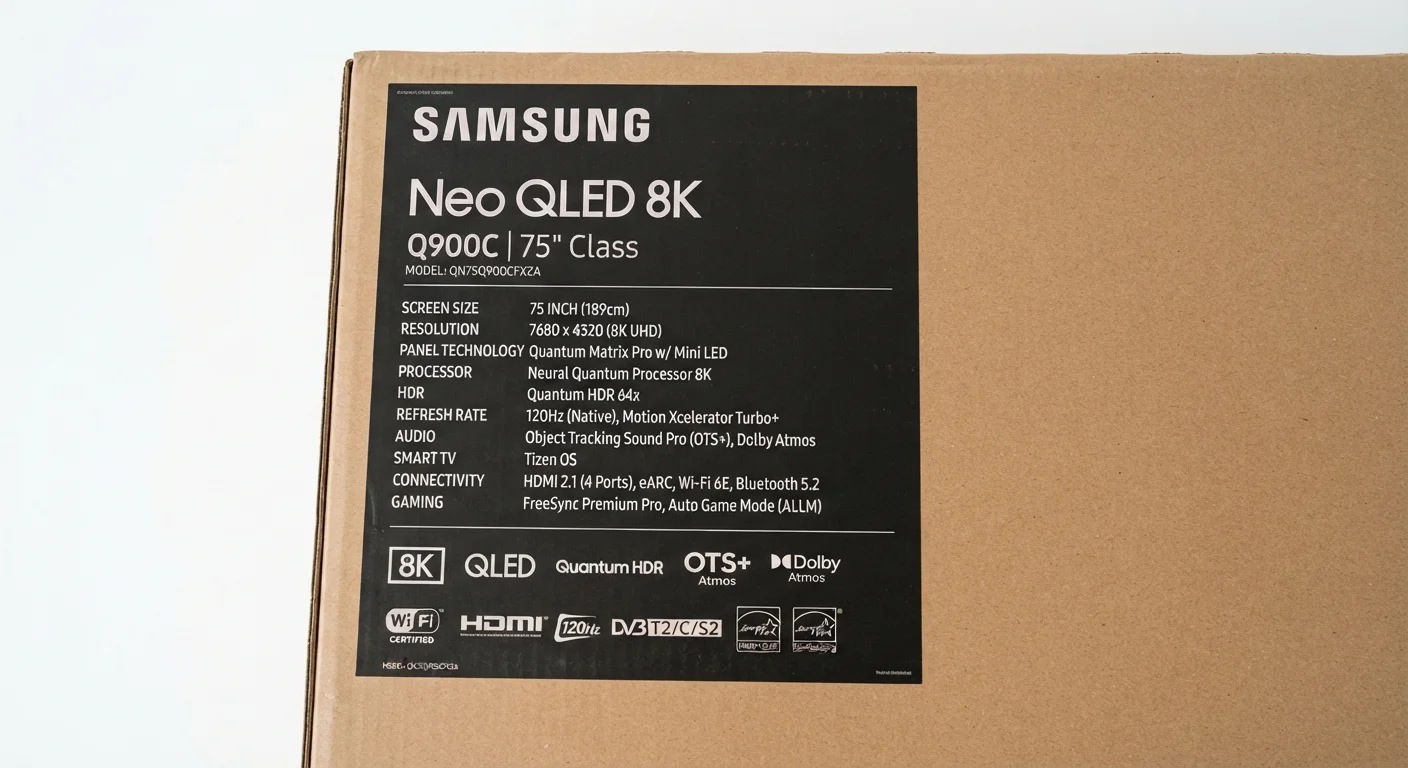
| 1080p pixel count | ~2 million pixels (1,920 × 1,080) |
| 4K pixel count | ~8 million pixels (3,840 × 2,160) |
| Standard entry-level refresh rate | 60 Hz native |
| Gaming-oriented refresh rate | 120 Hz native |
| HDR baseline standard | HDR10 (open, universally supported) |
| OLED key advantage | Per-pixel light control; true blacks |
Resolution: What 4K and 1080p Actually Describe
Resolution tells you how many individual pixels make up the picture. Each pixel is a tiny dot of light; more dots mean a sharper, more detailed image.
1080p (Full HD) contains roughly 2 million pixels arranged in a 1,920 × 1,080 grid. It remains the standard for cable broadcasts and older streaming libraries. 4K (Ultra HD) quadruples that count to approximately 8 million pixels at 3,840 × 2,160. The jump in detail is most visible on screens 50 inches or larger viewed from a typical living-room distance. 8K exists on shelves but carries very little native content as of now, making it a future-proofing consideration rather than a practical one for most households.
Resolution alone does not determine picture quality. A 4K label on the box tells you the screen's pixel count — not how well it handles color, contrast, or motion. See our guide to OLED and QLED panel technologies to understand how the underlying display type shapes what you actually see.
| 1080p pixel count | ~2 million pixels (1,920 × 1,080) |
| 4K pixel count | ~8 million pixels (3,840 × 2,160) |
| Standard entry-level refresh rate | 60 Hz native |
| Gaming-oriented refresh rate | 120 Hz native |
| HDR baseline standard | HDR10 (open, universally supported) |
| OLED key advantage | Per-pixel light control; true blacks |
Panel Technology: OLED, QLED, and LED/LCD Explained
The panel type determines how the TV produces light and controls contrast — arguably the single biggest influence on picture quality.
- LED/LCD: A liquid crystal display backlit by LEDs. Most entry-level and mid-range TVs use this technology. Brightness can be strong, but dark scenes may look washed out because the backlight cannot fully shut off.
- OLED (Organic Light-Emitting Diode): Each pixel generates its own light and can switch off completely, producing genuine blacks and nearly infinite contrast. Typically thinner and more power-efficient at lower brightness levels, but can be susceptible to image retention with static content displayed for long periods.
- QLED (Quantum Light-Emitting Diode): An LED/LCD panel enhanced with a quantum dot filter that expands the range of colors and peak brightness. Not self-emissive like OLED, but often reaches higher peak brightness — useful in bright rooms.
- Mini-LED: A refinement of LED/LCD that uses thousands of smaller LEDs for more precise local dimming zones, closing some of the contrast gap with OLED at a lower price point.
If you want to understand how similar technology plays out on smaller screens, our article on display technology on phones and tablets covers the same principles in a portable-device context.
Resolution
The total number of pixels on a screen, expressed as width × height (e.g., 3,840 × 2,160 for 4K). Higher resolution means more detail, particularly noticeable on larger screens.
HDR (High Dynamic Range)
A display standard that widens the gap between the darkest blacks and brightest highlights in an image. It requires both an HDR-capable TV and HDR-encoded content to take effect.
Refresh Rate (Hz)
The number of times per second a TV redraws the image. Higher native refresh rates (120 Hz vs. 60 Hz) produce smoother motion in sports, action content, and gaming.
Local Dimming
A technique where an LED/LCD TV dims specific zones of the backlight independently to deepen blacks in dark areas of the image without affecting bright areas.
HDMI 2.1
A high-bandwidth port standard that supports 4K video at 120 Hz, Variable Refresh Rate (VRR), and Auto Low Latency Mode (ALLM), primarily benefiting gaming console users.
Nits (cd/m²)
A unit measuring screen brightness. Higher nit counts help maintain picture quality and HDR impact in bright, sunlit rooms.
Color Gamut
The range of colors a display can reproduce, typically expressed as a percentage of a reference standard such as DCI-P3 or Rec. 2020. A wider gamut means more vivid, accurate color.
VRR (Variable Refresh Rate)
A feature that synchronizes the TV's refresh rate with the frame output of a connected gaming console or PC, reducing screen tearing and stutter during gameplay.
HDR, Refresh Rate, and the Other Labels Worth Understanding
HDR (High Dynamic Range) is a format that expands the range between the darkest and brightest parts of an image, producing more lifelike highlights and shadow detail. You will encounter several HDR labels:
- HDR10: The baseline open standard supported by virtually every HDR-capable TV and content platform.
- Dolby Vision: A proprietary format that uses dynamic metadata — meaning brightness instructions can change scene by scene rather than being set once for the whole film.
- HDR10+: Samsung's open alternative to Dolby Vision, also using dynamic metadata.
- HLG (Hybrid Log-Gamma): Designed for broadcast and live TV content rather than streaming.
Refresh rate is measured in hertz (Hz) and describes how many times per second the screen redraws the image. A 60 Hz panel refreshes 60 times per second; a 120 Hz panel refreshes 120 times, producing smoother motion in fast-moving sports or gaming content. Some manufacturers advertise "effective" or "motion-enhanced" rates — 240 Hz or higher — that are achieved through processing rather than native hardware capability. Look for the native refresh rate when comparing models.
HDMI 2.1 is a port standard found on newer TVs that supports higher-bandwidth signals, enabling 4K at 120 Hz and features useful for gaming consoles such as Variable Refresh Rate (VRR) and Auto Low Latency Mode (ALLM).
Once you understand these specs, questions about physical setup become easier to answer. Our article on choosing a TV screen size explains how resolution and viewing distance interact to help you pick the right screen dimensions for your room.
"Effective" vs. Native Refresh Rate
Many TV boxes advertise rates like 240 Hz or "TruMotion 240" that are not native hardware refresh rates. These figures are calculated by combining the native rate with motion-smoothing processing. When comparing TVs, ask specifically about the native (hardware) refresh rate — typically 60 Hz or 120 Hz — to make a fair comparison. Motion-smoothing processing can be adjusted or disabled in picture settings.
Smart TV Features and Audio Specs
Smart TV refers to a television with a built-in internet connection and an operating system capable of running streaming apps. The quality of the smart platform — how fast it responds, how frequently it receives software updates, and how many apps it supports — varies significantly between manufacturers. If a TV's built-in interface feels slow or limited, an external streaming device can supplement it. Our breakdown of streaming devices versus smart TVs covers when that trade-off makes sense.
Audio specifications on the box typically list speaker output in watts and the number of channels (e.g., 2.0, 2.1). A higher wattage number suggests more potential volume, but speaker quality depends on driver design and cabinet construction — not watts alone. Most built-in TV speakers benefit from a soundbar or external audio system in larger rooms.
For a broader look at how to interpret product spec sheets across categories, reading product specifications without getting lost in the jargon provides a practical framework applicable well beyond televisions.
4×
More pixels in 4K vs. 1080p
4K resolution contains approximately four times the pixel count of Full HD, making the difference most visible on screens 50 inches and larger.
120 Hz
Refresh rate for smoother gaming and sports
A native 120 Hz panel redraws the image twice as often as a 60 Hz panel, reducing motion blur in fast-action content.