

Key Takeaways
- Viewing distance — not room size — is the primary factor in choosing the right TV screen size.
- A TV that looks impressive in-store can feel overwhelming or pixelated at your actual seating distance.
- Room geometry, mounting height, and ambient light all affect how a screen size performs in practice.
- Industry guidelines suggest sitting roughly 1.5 to 2.5 times the screen's diagonal measurement from the screen.
Why Most People Choose the Wrong Size
Walk into any electronics store and the instinct is immediate: bigger feels better. Screens look stunning under controlled retail lighting at close range, and a 75-inch display creates genuine excitement. But excitement in a showroom rarely translates into comfort in a living room.
The core problem is that most first-time TV buyers anchor their decision to price and aesthetics rather than spatial math. They measure the wall, confirm the TV fits, and stop there — missing the variable that matters most: viewing distance.
Screen size only makes sense relative to how far away you sit. A 65-inch screen at six feet feels like sitting in the front row of a cinema. The same screen at twelve feet might look appropriately immersive. Neither experience is inherently right — the question is what your room actually allows. Understanding this logic up front saves money, reduces returns, and makes the eventual choice obvious rather than agonizing. If you're also trying to decode the technical labels on the box, our TV specs reference guide explains resolution, panel type, and refresh rate in plain language.
Choosing screen size based on wall space rather than viewing distance.
Why it happens: Buyers measure the wall, confirm the TV physically fits, and assume that's the right size check. The wall is a constraint, not a guide.
Judging screen size from a showroom without accounting for your room's lighting and layout.
Why it happens: Showrooms use bright, controlled lighting that makes images pop at close distances. Home environments vary enormously in ambient light, seating angles, and room depth.
Ignoring the vertical mounting position when planning screen size.
Why it happens: Most buyers think horizontally — will it fit between the bookshelves? — but neglect how high the screen will sit and whether that angle will be comfortable.
Assuming a larger screen always produces a better picture.
Why it happens: Marketing language reinforces the idea that bigger is premium. But screen size amplifies both image quality and image flaws — including compression artifacts in streaming content.
Forgetting to account for furniture arrangement changes after the TV arrives.
Why it happens: Buyers plan around current furniture placement, not realizing the new TV may prompt rearranging the room — which changes the actual viewing distance.
The Spatial Principles That Actually Guide the Decision
Two frameworks help ground TV sizing in reality rather than aspiration.
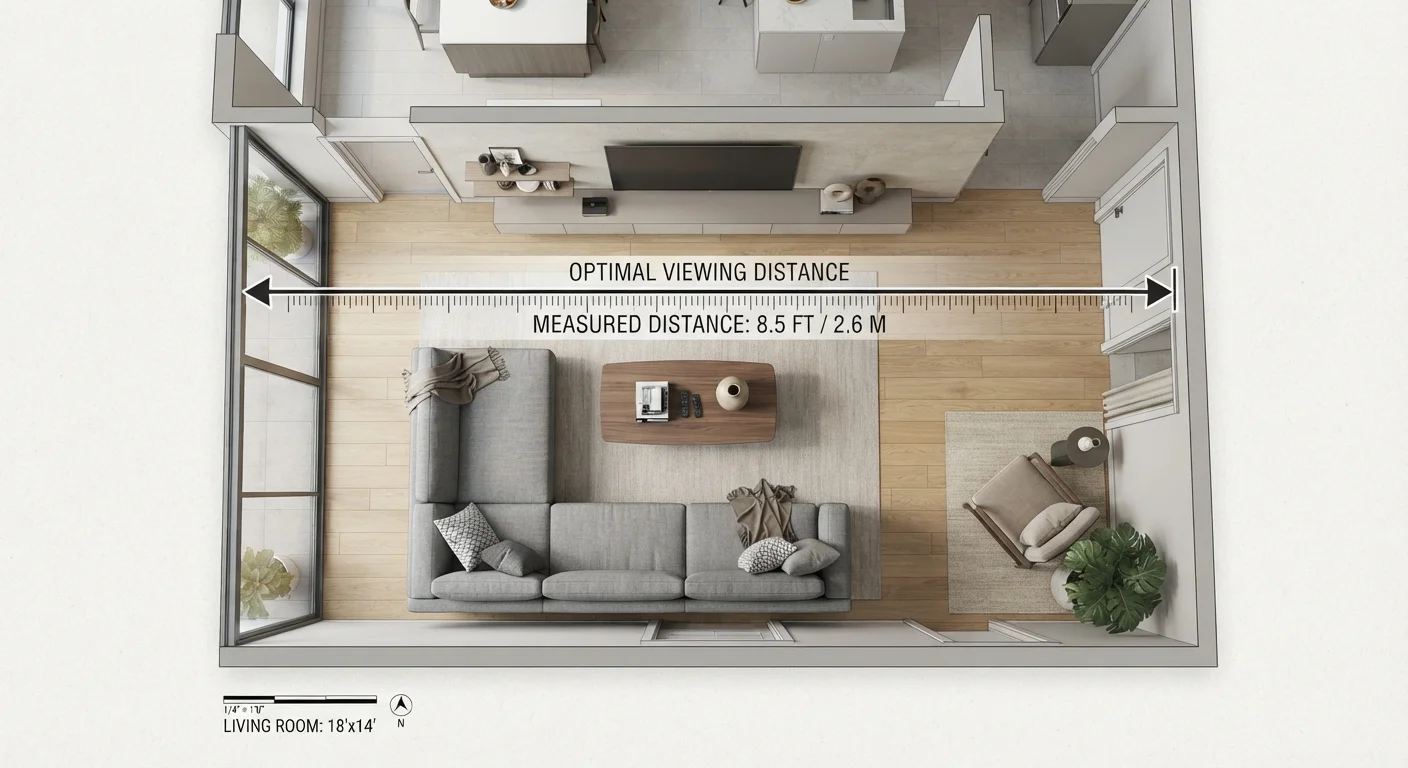
The viewing distance ratio: A widely used rule of thumb — informed by display industry research — suggests sitting between 1.5 and 2.5 times the screen's diagonal measurement away from the screen. For a 55-inch TV, that translates to roughly 7 to 11.5 feet. For a 75-inch TV, the comfortable range starts closer to 9 feet. Measure your actual seating distance before deciding on a size, not after.
Resolution interacts with distance: A 4K screen resolves far more detail than a 1080p display, meaning you can sit closer without seeing individual pixels. If your seating distance is shorter than average, a higher-resolution screen at a given size may be more comfortable than a lower-resolution one. For a deeper look at how display technology affects visual quality across different devices, see our article on display technology explained.
1.5–2.5×
Recommended viewing distance multiplier
Display industry guidelines consistently suggest sitting 1.5 to 2.5 times the screen's diagonal distance away for comfortable viewing.
42–48 in
Ideal screen center height from floor
Ergonomics research on seated posture suggests screen centers at or near eye level — typically 42 to 48 inches — reduce neck strain during extended viewing.
Mounting height matters: A TV mounted too high forces sustained neck tilt, which becomes uncomfortable during long viewing sessions. The center of the screen should generally sit at or near seated eye level — typically 42 to 48 inches from the floor for most sofas. A larger screen mounted at the wrong height compounds the discomfort rather than fixing it.
These principles also connect to a broader truth about setting up a home entertainment space incrementally. If you're starting from scratch, our article on starting small with home tech is worth reading before committing to a large integrated setup. And once your screen is sorted, pairing it with the right audio setup is the logical next step — see our guide to matching audio to your space for practical guidance.
Measure Viewing Distance Before Anything Else
The single most consequential step in choosing a TV is measuring the distance from your seating to the wall before setting foot in a store. Write that number down. Every other decision — screen size, resolution, budget — follows from it. Skipping this step is the root cause of most TV sizing regrets.