

Key Takeaways
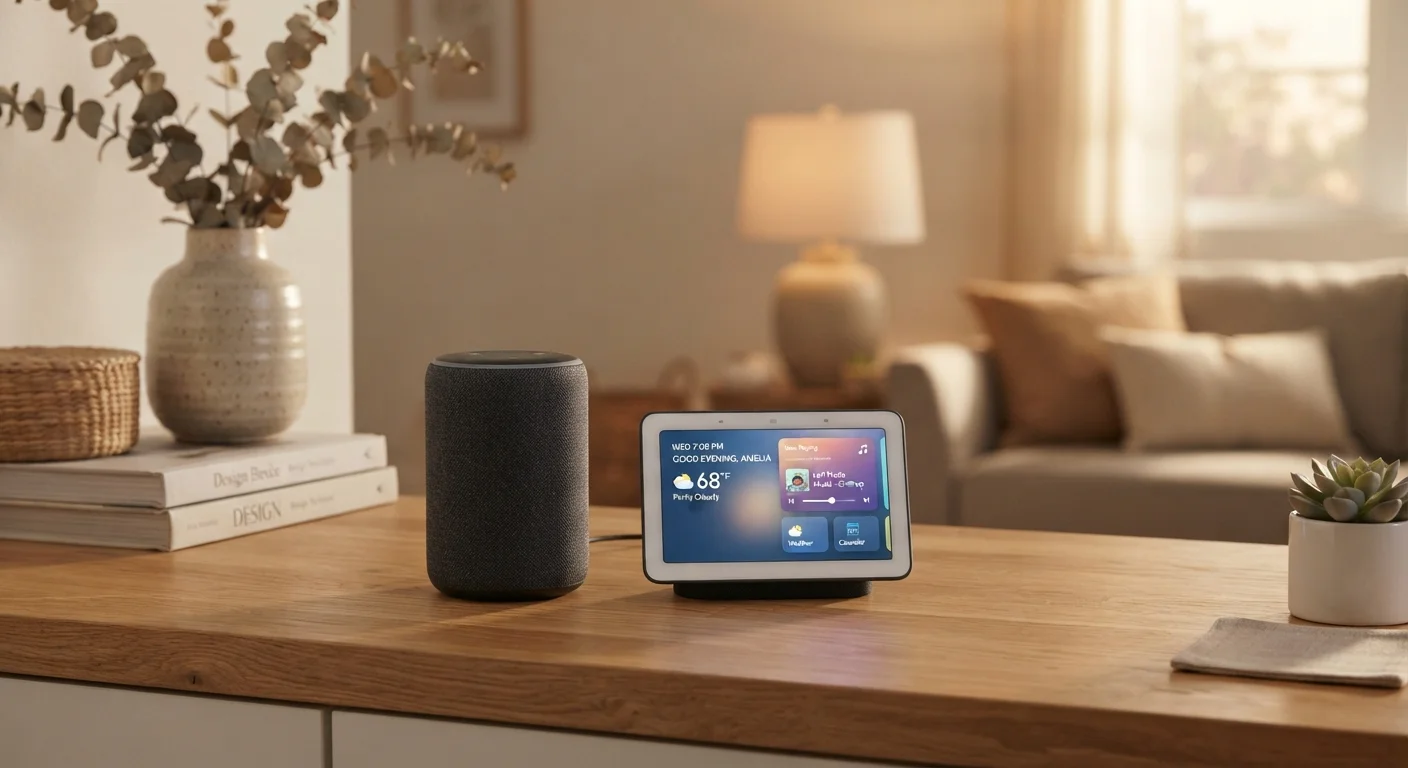
- Smart speakers rely entirely on voice and audio; smart displays add a touchscreen for visual interaction.
- Smart displays typically cost more and take up more counter space than comparable smart speakers.
- Both form factors can control compatible smart home devices using the same voice assistants.
- A smart display makes the most sense when placed where you regularly glance at information — kitchens and bedrooms.
- For pure audio quality in a shared space, a smart speaker often delivers better value per dollar.
Option A
Smart Speaker
The voice-first, audio-focused home hub.
Best for: People who want hands-free voice control, music playback, and smart home management without a screen.
Option B
Smart Display
The screen-equipped, visually interactive alternative.
Best for: People who want voice control plus a screen for video calls, recipes, visual timers, and streaming.
If you primarily want music, podcasts, and voice control
Smart Speaker
Smart speakers are optimized for audio output and hands-free commands — they do this job efficiently without the added cost of a screen.
If you want video calls or want to follow visual step-by-step recipes
Smart Display
A screen transforms ambient queries into visual experiences, making video calls and illustrated cooking guides genuinely usable at a glance.
If counter space or budget is tight
Smart Speaker
Smart speakers have a smaller footprint and lower entry-level price, making them more practical for compact kitchens or limited budgets.
If you have young children or elderly family members who benefit from visual cues
Smart Display
On-screen responses, visual timers, and photo slideshows add an accessibility layer that pure voice responses can't replicate.
If you're setting up your first smart home and want to start simple
Smart Speaker
A smart speaker is an lower-stakes entry point — it integrates with most smart home ecosystems and teaches you how voice assistants work before you invest further.
What Each Device Actually Does
A smart speaker is essentially a Wi-Fi-connected speaker with a built-in voice assistant — think of it as a microphone and audio driver in one compact unit. You speak a command, it processes your request, and responds with audio. That's the complete interaction loop.
A smart display does all of that and adds a touchscreen. Responses that would be spoken on a smart speaker — a weather forecast, a shopping list, a timer countdown — are also shown visually. You can tap the screen, watch videos, and conduct video calls. For a fuller picture of how these devices fit into the broader smart home ecosystem, see our Smart Home Devices Explained guide.
Both categories typically use the same underlying voice assistants and can control compatible lights, locks, and thermostats. The core difference is the output modality: audio only versus audio plus visuals.
| Criterion | Smart Speaker | Smart Display |
|---|---|---|
| Output type | Audio only | Audio + touchscreen visuals |
| Typical entry-level price | Lower cost | Moderate to higher cost |
| Physical footprint | Compact, cylindrical | Larger, requires sightline |
| Video calling | Not supported | Supported with camera |
| Recipe / visual guidance | Voice-only instructions | On-screen step-by-step display |
| Music & audio quality | Often prioritized in design | Functional, not always primary focus |
| Smart home control | Full voice control | Voice + touchscreen control |
| Privacy considerations | Microphone only | Microphone and camera |
Where You Place It Changes Everything
Placement is the single most practical filter for this decision. Smart speakers thrive in rooms where you're listening — a living room where music fills the space, a bedroom where you ask for the forecast before getting up, or an office where you set timers without looking away from your screen.
Smart displays earn their value in rooms where you're looking. The kitchen is the strongest use case: a visual recipe with ingredient quantities displayed step-by-step is genuinely more useful than an assistant reading instructions aloud while your hands are covered in flour. Similarly, a bedside smart display showing a visual alarm interface or a photo slideshow justifies the larger footprint in a way a bedroom smart speaker might not.
~60%
Smart speaker owners who place one in the kitchen
Industry research from NPR and Edison Research consistently finds the kitchen among the most common rooms for voice assistant device placement.
2–3x
Approximate price multiple of displays over speakers
Across most product tiers, smart displays carry a significant price premium over comparable smart speakers from the same manufacturer.
If you're comparing this decision to choosing a screen for another room entirely, our article on streaming devices versus smart TVs covers a related set of tradeoffs worth reading alongside this one.
Cost, Size, and Practical Tradeoffs
Smart speakers generally cost less than smart displays — often significantly so at the entry level. That price gap reflects the screen hardware, but it also reflects design complexity: smart displays require more processing power to render video and handle touch input.
Size matters too. A smart speaker is typically a compact cylinder or dome that fits almost anywhere. A smart display is a small tablet-like device on a stand — it needs clear sightlines and a stable surface. In a small apartment or a cramped kitchen counter, that physical footprint is a real consideration.
Privacy is another variable worth weighing. Both device types have always-on microphones, but smart displays also have cameras for video calls — an additional data collection surface. Our Smart Home Privacy guide breaks down what data these devices typically collect and which settings are worth adjusting.
Camera Privacy on Smart Displays
Smart displays with built-in cameras can typically be physically shuttered or disabled via software when not in use for video calls. Before purchasing, check whether the model you're considering has a hardware camera shutter — this is a meaningful privacy safeguard. Review any device's privacy settings during initial setup rather than leaving defaults in place.
If you're new to smart home tech, the case for starting small is worth reading before committing to either form factor. One well-placed device often delivers more value than several underused ones.